
How AI Reads Your Bank Statement and Auto-Posts Entries — No More Manual Data Entry
If you've ever sat with a bank statement PDF in one tab and your accounting software in another, typing out line after line of debits, credits, and narrations — you already know how much of a business's "accounting time" isn't accounting at all. It's data entry.
For a CA firm juggling ten clients, or an SME owner doing their own books after hours, this is often the single most time-consuming, error-prone part of the month. One misread digit, one skipped row, and your books are off — and now you're hunting for the mismatch instead of doing anything that actually needs your judgment.
This is exactly the problem Digital Dreams Infotech - PlusERP built AI-powered bank statement entry to solve a feature built right into our software, not a bolt-on tool you have to switch between.
What the AI Feature Actually Does
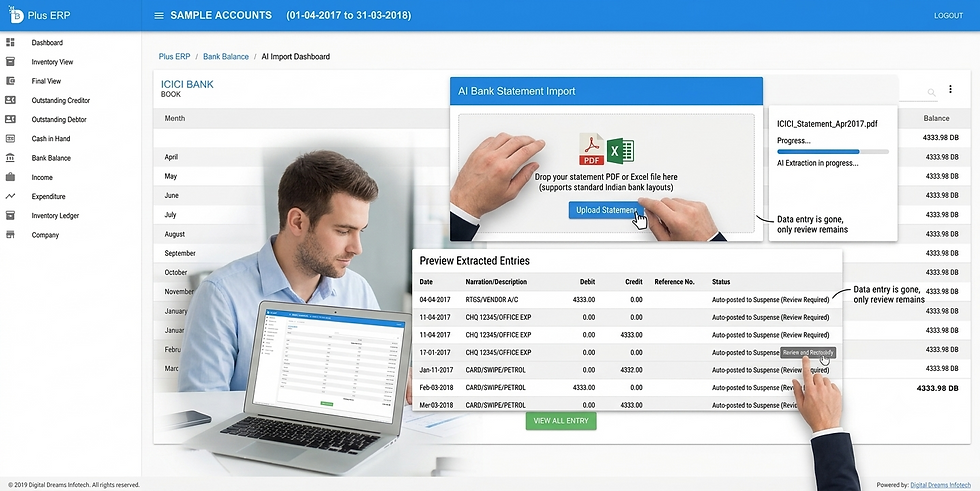
In plain terms: you upload your bank statement — as a PDF or an Excel file — directly into our software, and the AI reads it, understands each line, and posts every transaction straight into a suspense account. From there, all you have to do is review the suspense account and move each entry into its correct, genuine ledger account. No retyping. No copy-pasting into a spreadsheet first. No manually keying in every single transaction line by line.
It's built to handle both formats banks actually send you: the PDF statement you download from net banking, and the Excel export some banks provide instead. You don't need to convert or reformat anything before uploading — just bring your statement straight into our software.
How It Works, Step by Step
1. Upload your statement, straight into our software Drop the PDF or Excel file into Digital Dreams Infotech exactly as your bank gave it to you. No reformatting columns, no cleaning up the file first — the system reads standard Indian bank statement layouts as-is.
2. AI extraction The AI reads through the statement and pulls out what matters from each line — transaction date, narration/description, debit or credit amount, and running balance. This used to be entirely manual; now it happens in seconds across the whole statement, not line by line.
3. Auto-posting to a suspense account Here's the part that actually saves the hours: every transaction is posted automatically into a suspense account inside your software. Nothing sits half-done in a spreadsheet or in limbo waiting for you to type it in — the full statement is already in your books, just parked under "suspense" until it's sorted into the right ledger.
4. Review and reclassify — the only manual step left Instead of creating every entry from scratch, you're simply looking at the suspense account and moving each transaction to its genuine ledger — a customer, a vendor, an expense head. This is a review-and-sort task, not a data-entry task, and it's the single biggest reason this cuts entry time down to almost nothing. You stay in full control of where every rupee is finally recorded; the AI just removes the typing.
5. Done — books stay accurate Once reclassified out of suspense, entries sit in your books exactly where they belong. What used to be an afternoon of typing becomes a few minutes of sorting.
The Time Difference, In Real Terms
Manually entering a statement with 150-200 transactions typically takes a few hours — typing each line, then figuring out which ledger it belongs to. With our AI-powered import, that same statement is fully posted to the suspense account in seconds, and all that's left is reviewing and reclassifying — a task that takes minutes, not hours, because the data entry itself is already done.
For a CA firm handling multiple clients' books every month, that difference compounds fast. It's not just faster bookkeeping — it's hours back to spend on advisory work, GST filing, or actually growing the practice instead of retyping bank statements.
Who This Helps Most
CA firms and accountants managing books for multiple clients, where bank statement entry eats a disproportionate amount of monthly billable time
SMEs and distributors with high transaction volume — retail, FMCG distribution, wholesale — where hundreds of transactions a month make manual entry genuinely unsustainable
Business owners doing their own books who don't have a full-time accountant but still need accurate, up-to-date records
See It on Your Own Statement
The best way to understand how much time this saves is to try it on a real statement from your own business or a client's, inside Digital Dreams Infotech's own software. Get in touch for a demo, or if you're a CA looking to offer this to your clients, check out our partner program.


Comments